Tampilkan postingan dengan label tools analysis. Tampilkan semua postingan

Senin, 26 September 2011

VB Decompiler

VB Decompiler Lite is a decompiler for programs (EXE, DLL or OCX) written in Visual Basic 5.0 and 6.0 and disassembler for programs written on .NET technology. As you know, programs in Visual Basic can be compiled into interpreted p-code or into native code.

Since p-code consists of high-level commands, there is a real possibility to decompile it into the source code (of course, the names of variables and some functions will not be decompiled). VB Decompiler Lite restores source code from p-code as much as possible precisely.

And after some modifications you may try to compile generated code. If a program was compiled into the native code, restoring full source code from machine instructions is not possible. But VB Decompiler Lite can help to analyze the program even in this situation as well.

It contains a powerful disassembler and emulator. This powerful engine tries to decode most assembler instructions to most likely VB commands. Of course, it fails on some optimizations of assembler code and sometimes generate incorrect instructions. But at this time this is a best way to analyze native code applications.

If a program was compiled to .NET assembly, decompiler will recover all tables and modules in managed assembly and disassemble all methods, functions and events using IL disassembler. .NET FrameWork is not needed for decompilation.

In general, VB Decompiler Lite is an ideal tool for analyzing programs and it is perfect if you lose the source code and need to partially restore the project. VB Decompiler Lite is the ideal tool for programs analysis and recovering lost source code.

** Here are some key features of "VB Decompiler Lite":

· Decompiling forms and usercontrols object files
· P-code decompiling
· Disassembling native code procedures
· Syntax coloring in decompiled code
· String reference list and search engine
· Fast decompiling speed

Download

SysAnalyzer


SysAnalyzer is an automated malcode run time analysis application that monitors various aspects of system and process states. SysAnalyzer was designed to enable analysts to quickly build a comprehensive report as to the actions a binary takes on a system. SysAnalyzer can automatically monitor and compare:

* Running Processes
* Open Ports
* Loaded Drivers
* Injected Libraries
* Key Registry Changes
* APIs called by a target process
* File Modifications
* HTTP, IRC, and DNS traffic

SysAnalyzer also comes with a ProcessAnalyzer tool which can perform the following tasks:

* Create a memory dump of target process
* parse memory dump for strings
* parse strings output for exe, reg, and url references
* scan memory dump for known exploit signatures

Full GPL source for SysAnalyzer is included in the installation package.

Stud PE

This application is a portable executable (.exe) editor

Stud_PE is a portable Executables (.exe) editor and features a very easy to use interface.

Stud_Pe also features an extensive list of settings and editing options.

** Here are some key features of "Stud_PE":

view/edit PE basic Header information (DOS also):
· header structures to hexeditor;
view/edit Section Table:
· add new section;
view/edit Directory Table:
· Import/Export Table viewer;
· Import adder;
· Resource viewer/editor (save/replace ico/cur/bmp);
Pe Scanner (PEiD sig database):
· 400 packers/protectors/compilers;
· Task viewer/dumper/killer;
· PEHeader/Binary file compare;
· RVA to RAW to RVA;
· Drag'nDrop shell menu integration;
· Basic HexEditor;

Download

Sandboxie

Lets you browse the Web securely while keeping all your browser's functionality for active content

Sandboxie requires neither the disabling nor blocking of functions available to Web sites through the browser. Instead, Sandboxie isolates and quarantines the outcome of whatever the Web site may do to your computer, including the installation of unsolicited software.

There is no trade-off of functionality for security: the Web site can use the full range of active content tools, and if it uses these tools maliciously to install software or otherwise make changes in your computer, then these changes can be easily undone.

Sandboxie has originally been designed to increase the security of browsing with Internet Explorer, however it is just as effective with any other browser, and in fact, any other program. Sandboxie wraps a protection layer around the programs it supervises. It is this layer that intercepts and isolates any changes the programs make to the computer. And this layer is impartial to the specific program it wraps.

Sandboxie was designed as an application that will allow you to isolate and quarantine websites.

When you browse the web, changes occur to your computer system. Most of the time these changes are harmless, like recording the addresses of web sites you have visited (and when), so the browser can help you complete a web address that you type in. Whether these changes are harmless or harmful, they do in fact happen to your computer system.

When you use Sandboxie to protect your browsing session, it catches all these changes just as the browser is about to apply them into your computer system. Sandboxie does record these changes on behalf of the browser, but it records them in a special isolated folder, called the sandbox.

The benefit of having a sandbox is that it ensures your ability to get rid of all changes done by the browser, simply by deleting the sandbox folder.

Another useful feature of Sandboxie is the ability to terminate all sandboxed programs at once. As some web sites tend to pop up three new browser windows for each one you close, you can have Sandboxie close all of them with a click of a button.


Download

Rootkit Unhooker

Rootkit Unhooker - an advanced rootkit detection/removal utility

** Here are some key features of "Rootkit Unhooker":

Service Descriptor Table hooks detection
· Includes Service Descriptor Table hooks removing (unhooking)

SYSENTER/Int 2e hooks detection
· Detection of hooking sysenter instruction handler and system interrupt (IDT) hook

SYSENTER/Int 2e hooks removing (unhooking)
· Restoring original instruction (interrupt) handler

Hidden processes detection
· Detection of processes hidden from Windows API
· Most powerful in the world at current time
· Detection of processes with full path and name (unique)

Hidden processes terminating
· Including force-kill powered by PVASE
· (c) PVASE Process Virtual Address Space Erasing

Hidden processes dumping
· With ability to rebuild file for analysis

Hidden drivers detection
· Detection of drivers hidden from Windows API
· combines four different methods of detection and including special five (c) Stealth Walker technology
· and six (c) KMSE - Kernel Memory Scanning Engine

Hidden drivers dumping
· Unique feature that gives you ability to make dump of selected driver

IRP hooks detection
· Look for "References" column on the Hidden Drivers Detector page

Detection of API-based hooks (Code Hooks Detection)
· Includes most powerful at this time inline (splicing) hooks detection in drivers and libraries. Detected hooks: on functions and on IRP's (for drivers)

Detection of hidden libraries
· As part of Code Hooks Detector page. Displays address (if can be determined) of hidden library

Hidden files detection
· Includes detection of files hidden from Windows API on the disks. Supported file systems are: FAT32 and NTFS (full support - including ADS).

Low level files operation
· Wipe/Copy functions for visible and hidden files (including ADS).

Update system
· Can check our server for program updates

Report generation
· Automatically generates report with all needed information (not huge and useless like in others programs)

Program self-protection
· Contains some methods that are able to prevent some malware from interrupting work of program. Includes internal integrity checking and antidebugging

Download

Regmon

Regmon is a monitoring utility that will show you which applications are accessing your Registry

Regmon is a Registry monitoring tool that will show you which applications are accessing your Registry, which keys they are accessing, and the Registry data that they are reading and writing - all in real-time.

This advanced utility takes you one step beyond what static Registry tools can do, to let you see and understand exactly how programs use the Registry. With static tools you might be able to see what Registry values and keys changed.

With Regmon you`ll see how the values and keys changed.

Installation and Use
Install Regmon by copying the files to your hard drive, and start it by running Regmon.exe. Menu items and tool bar buttons can be used to toggle on and off monitoring, disable event capturing, control the scrolling of the listview, and save the listview contents to an ASCII file.

Use the Filter dialog, which is accessed with a toolbar button or the Option|Filter/Highlight menu selection, to select what data will be shown in the list view. The '*' wildcard matches arbitrary strings, and the filters are case-insensitive. Only matches shown in the include filter, but that are not excluded with the exclude filter, are displayed. Use ';' to separate multiple strings in a filter (e.g. "regmon;software").

For example, if the include filter is HKLM", and the exclude filter is "HKLMSoftware", all references to keys and values under HKLM, except to those under HKLMSoftware will be monitored.

Wildcards allow for complex pattern matching, making it possible to match specific Registry accesses by specific applications, for example. The include filter "Winword*Windows" would have Regmon only show accesses by Microsoft Word to keys and values that include the word "Windows".

Use the highlight filter specify output that you want to have highlighted in the listview output. Select highlighting colors with Options|Highlight Colors.

Regmon can either timestamp events or show the time elapsed from the last time you cleared the output window (or since you started Regmon). The Options menu and the clock toolbar button let you toggle between the two modes. The button on the toolbar shows the current mode with a clock or a stopwatch. When showing duration the Time field in the output shows the number of seconds it took for the underlying file system to service particular requests.

When you see a Registry value or key in Regmon's output that you want to edit, simply double click on the line that includes the reference (or use the Regedit toolbar button) and Regmon will take you directly to the specific value using Regedit.

Download

quick unpack

The program is intended for fast (in a few seconds) unpacking of packers and simple protectors.

Quick Unpack tries to bypass all possible scramblers/obfuscators and restores redirected import. From the version 1.0 the opportunity of unpacking dll is added. From the version 2.0 the attach process feature added which allows to use Quick Unpack as a dumper and import recoverer. Scripts are also supported from version 2.0 which allows unpacking of more complicated protections. This makes Quick Unpack a unique software product which has no similar analogues in the world!

Use force unpacking tick. When the application is run QuickUnpack waits for the OEP breakpoint to trigger. But sometimes this breakpoint may be triggered several times but only the last one is the correct OEP. Using ForceMode option solves this problem. With this option after the application is run QuickUnpack counts breapoint hits and dumps the application only at the last stop. For DLL-files this option is always ticked and allows to restore relocs.

Download

Process Monitor

Process Monitor is an advanced monitoring tool for Windows that shows real-time file system, Registry and process/thread activity. It combines the features of two legacy Sysinternals utilities, Filemon and Regmon, and adds an extensive list of enhancements including rich and non-destructive filtering, comprehensive event properties such session IDs and user names, reliable process information, full thread stacks with integrated symbol support for each operation, simultaneous logging to a file, and much more. Its uniquely powerful features will make Process Monitor a core utility in your system troubleshooting and malware hunting toolkit.

Process Monitor includes powerful monitoring and filtering capabilities, including:

  • More data captured for operation input and output parameters
  • Non-destructive filters allow you to set filters without losing data
  • Capture of thread stacks for each operation make it possible in many cases to identify the root cause of an operation
  • Reliable capture of process details, including image path, command line, user and session ID
  • Configurable and moveable columns for any event property
  • Filters can be set for any data field, including fields not configured as columns
  • Advanced logging architecture scales to tens of millions of captured events and gigabytes of log data
  • Process tree tool shows relationship of all processes referenced in a trace
  • Native log format preserves all data for loading in a different Process Monitor instance
  • Process tooltip for easy viewing of process image information
  • Detail tooltip allows convenient access to formatted data that doesn't fit in the column
  • Cancellable search
  • Boot time logging of all operations
The best way to become familiar with Process Monitor's features is to read through the help file and then visit each of its menu items and options on a live system.

Download

Process Explorer

Ever wondered which program has a particular file or directory open? Now you can find out. Process Explorer shows you information about which handles and DLLs processes have opened or loaded.

The Process Explorer display consists of two sub-windows. The top window always shows a list of the currently active processes, including the names of their owning accounts, whereas the information displayed in the bottom window depends on the mode that Process Explorer is in: if it is in handle mode you'll see the handles that the process selected in the top window has opened; if Process Explorer is in DLL mode you'll see the DLLs and memory-mapped files that the process has loaded. Process Explorer also has a powerful search capability that will quickly show you which processes have particular handles opened or DLLs loaded.

The unique capabilities of Process Explorer make it useful for tracking down DLL-version problems or handle leaks, and provide insight into the way Windows and applications work.

Download

PE view

Anywhere PE View is a free tool for exploring PE (Portable Executable) files (EXE, DLL).

With Anywhere PE View, you can inspect all PE headers, view export tables and import tables and resources.

Download

Anywhere PE View can generate HTML reports with all information from headers, export some types of resources (RT_ICO, RT_STRING, AVI) into files and compute the PE checksum.
Platform independence

Anywhere PE View is a cross-platform application. Written entirely in Java, it works on different platforms, such as Microsoft Windows, Mac OS X, IBM OS/2 and Linux.

PEiD Explorer

PEiD detects most common packers, cryptors and compilers for PE files

PEiD detects most common packers, cryptors and compilers for PE files and currently it can detect more than 470 different signatures in PE files.

PEiD is special in some aspects when compared to other identifiers already out there!

Here are some key features of "PEiD updated":

· It has a superb GUI and the interface is really intuitive and simple.
· Detection rates are amongst the best given by any other identifier.
· Special scanning modes for *advanced* detections of modified and unknown files.
· Shell integration, Command line support, Always on top and Drag'n'Drop capabilities.
· Multiple file and directory scanning with recursion.
· Task viewer and controller.
· Plugin Interface with plugins like Generic OEP Finder and Krypto ANALyzer.
· Extra scanning techniques used for even better detections.
· Heuristic Scanning options.
· New PE details, Imports, Exports and TLS viewers
· New built in quick disassembler.
· New built in hex viewer.
· External signature interface which can be updated by the user.

Download

PE Explorer

PE Explorer provides a UI for exploring and editing the contents of EXE, DLL, ActiveX controls, and other 32-bit executable file formats. PE Explorer comes with a visual resource editor, PE header viewer, automatic UPX and Upack unpackers, exported and imported API function viewer and syntax lookup, digital signature viewer, dependency scanner, and a disassembler. With PE Explorer, you can apply a professional approach to research and reverse engineering of win32 PE executable files. PE Explorer also allows you to remove both debugging information and the base relocation table from an executable, patch a pre-existing binary exe to inject the require administrator info into it so that it would be forced to run as administrator on Windows Vista, providing the application the same operational behavior as in Windows XP.

Download


P32Dasm

P32Dasm is a Visual Basic 5.0/6.0 PCode + Native code Decompiler. It can generate String, Numbers, Objects, Import and Export function listing. There is also Jump calculator. For VB Native code executables are generated only MSVBVM, External calls and string references. Usefull for setting BPX, you don't need search in debugger where start some Command Button event. You can generate .map files, which you can import to DataRescue IDA (LoadMap plugin) or to Olly Debugger (MapConv plugin).

OllyDbg

OllyDbg is a 32-bit assembler level analysing debugger for Microsoft® Windows®. Emphasis on binary code analysis makes it particularly useful in cases where source is unavailable.

Special highlights are:

* Intuitive user interface, no cryptical commands
* Code analysis - traces registers, recognizes procedures, loops, API calls, switches, tables, constants and strings
* Directly loads and debugs DLLs
* Object file scanning - locates routines from object files and libraries
* Allows for user-defined labels, comments and function descriptions
* Understands debugging information in Borland® format
* Saves patches between sessions, writes them back to executable file and updates fixups
* Open architecture - many third-party plugins are available
* No installation - no trash in registry or system directories

* Debugs multithread applications
* Attaches to running programs
* Configurable disassembler, supports both MASM and IDEAL formats
* MMX, 3DNow! and SSE data types and instructions, including Athlon extensions
* Full UNICODE support
* Dynamically recognizes ASCII and UNICODE strings - also in Delphi format!
* Recognizes complex code constructs, like call to jump to procedure
* Decodes calls to more than 1900 standard API and 400 C functions
* Gives context-sensitive help on API functions from external help file
* Sets conditional, logging, memory and hardware breakpoints
* Traces program execution, logs arguments of known functions
* Shows fixups
* Dynamically traces stack frames
* Searches for imprecise commands and masked binary sequences
* Searches whole allocated memory
* Finds references to constant or address range
* Examines and modifies memory, sets breakpoints and pauses program on-the-fly
* Assembles commands into the shortest binary form
* Starts from the floppy disk

and much, much more!

Download

Multipot

The iDefense Multipot is a emulation based honeypot designed to capture malicious code which spreads through various exploits across the net.

Design specifications for this project mandated that the captures be done in such a way so that the host machine would require only minimal supervision and would not itself risk getting infected.

Multipot was designed to emulate exploitable services to safely collect malicious code.

Who would use MultiPot and why?

  • ISP’s to monitor their networks
  • Corporate Security personnel to be warned of infections
  • Security researchers to build statistics of Internet health & exploitation
  • Virus researchers to collect new samples of malware in the wild
  • Hobbyists and students to learn more about Internet Security
Download

Malcode Analysis Pack

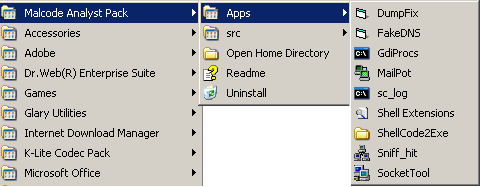
The Malcode Analyst Pack contains a series of utilities that were found to be necessary tools while doing rapid malcode analysis.

Included in this package are:

• ShellExt - 4 explorer shell extensions
• socketTool - manual TCP Client for probing functionality.
• MailPot - mail server capture pot
• fakeDNS - spoofs dns responses to controlled ip's
• sniff_hit - HTTP, IRC, and DNS sniffer
• sclog - Shellcode research and analysis application
• IDCDumpFix - aids in quick RE of packed applications
• Shellcode2Exe - embeds multiple shellcode formats in exe husk
• GdiProcs - detect hidden processes

Download

LordPE Deluxe

The first GUI PE editor in the world supporting the new PE32+ (64bit) format ?! (only editing support - no rebuilding, dumping, comparing etc.)
* New plugin interface added! You can develop LordPE Dump Engines (LDE) now.
Look at \Docs\LDE.tXt for more information.
* Added LDE: IntelliDump which can dump .NET CLR processes
* Added structure lister for SectionHeaderTable, PE headers and DataDirectories (the "L" buttons)
* Added hex edit buttons (the "H" buttons) in the DataDirectoryTable viewer
* Added PE.OptionalHeader.Magic and PE.OptionalHeader.NumberOfRvaAndSizes to the PE editor
* TLSTable DataDirectory is now editable
* Possibility to increment/decrement the number of DataDirectories added
* Etc etc etc...

Download

Import REConstructor


This tool is designed to rebuild imports for protected/packed Win32 executables. It reconstructs a new Image Import Descriptor (IID), Import Array Table (IAT) and all ASCII module and function names. It can also inject into your output executable, a loader which is able to fill the IAT with real pointers to API or a ripped code from the protector/packer (very useful against emulated API in a thunk).

Sorry but this tool is not designed for newbies, you should be familiar a bit with manual unpacking first (some tutorials are easy to find on internet).

Features:

- Imports
- An original tree view
- 2 different methods to find original imports (by IAT and/or API calls)
- A *FULL* complete rebuilder (including a new fresh IAT)

- Loader
- An analyzer and ripper of redirected API code
- An injected loader code to support mix of imports + ripped code in a thunk
- A heuristic relocator

- Tracers
- 3 default tracers (disasm, hook & ring3) to find APIs in redirected code
- A plugin interface to develop your own tracers

- Misc
- Support ALL 32/64bits Windows (9x, ME, NT, 2k, XP and Vista32/64)
- An export renormalizer for Win9x/ME (ala Icedump)
- A built-in coloured disasm/hex-viewer to analyze the redirected code
- A built-in dumper
- Support almost all known antidump tricks

Download

HHD Free Hex Editor

Free Hex Editor is award-winning large files optimized freeware editor for everyone who works with ASCII, hex, decimal, float, double and binary data.

Freeware Hex Editor Neo allows you to view, modify, analyze your hexadecimal data and binary files, edit, exchange data with other applications through the clipboard, insert new data and delete existing data, as well as perform other editing actions.

Make patches with just two mouse clicks; manipulate your EXE, DLL, DAT, AVI, MP3, JPG files with unlimited undo/redo. Taste the visual operation history with branching.

This hex and binary code data editing software utility for Windows includes the following basic functionality: Unlimited Undo/Redo; Find; Replace; Visual History Save and Load; Patch Creation; Clipboard Operations; Bytes, Words, Double Words, Quad Words, Floats and Doubles Edit Mode.

Free Hexeditor Neo is the only binary files editor that deals with large files faster than

Download

FileMon for Windows

FileMon is a program that shows information on the files that are being executed in the operating system.

FileMon monitorizes and shows information in real time on the activity of the filing system of a computer. Its advanced capacities make FileMon a powerful tool to observe the way in which Windows works, seeing how the applications use the files and the DLLs, or making a follow-up of the problems of the system or the configuration files of the applications.

FileMon has the capacity to show the exact date (hour, minute, second) in which an action happens: open, read, write or erase.

FileMon is very easy to use, you will be a single expert in minutes. As soon as the application is sent, it will begin to monitorize. The exit by screen can be kept in a file for its later visualization. It has the capacity to search and to filter results

Download

Most Wanted