Selasa, 11 Oktober 2011

Security Task Manager

Security Task Manager is a desktop application, produced by Neuber Software GmbH, based in Halle, Germany. It detects all tasks/processes running on the computer and displays their ranking according to their security risk rating. The user will at a glance see detailed report on each task/process and quarantine or remove spyware, malware, keyloggers, and Trojans. Along with the rating, the program shows other details including file path, file description, CPU usage graph, hidden functions, process type and more. Once a highly rated process is detected, the user can quarantine it by moving it to the isolated folder and deleting corresponding Autostart keys in the Windows Registry. The full version of Security Task Manager also features SpyProtector add-on tool that will help the user delete traces of Internet and computer activity and disable keyboard/mouse surveillance software. The program warns the user when the Autostart key in the Windows Registry is modified.

Security Task Manager was selected as Top Download Picks of 2005 by the Washington Post and PC World.

Security Task Manager is also mentioned in a book: "Malware Forensics: Investigating and Analyzing Malicious Code" and several security related sites


Download Security Task Manager

Process Monitor

Process Monitor is a free tool from Windows Sysinternals, part of the Microsoft TechNet website. The tool, as an alternative to Windows Task Manager, monitors and displays in real-time all file system activity on a Microsoft Windows operating system. It combines two older tools, FileMon and RegMon and is used in system administration, computer forensics, and application debugging.

Process Monitor monitors and records all actions attempted against the Microsoft Windows Registry. Process Monitor can be used to detect failed attempts to read and write registry keys. It also allows for filtering on specific keys, processes, process IDs, and values. In addition it shows how applications use files and DLLs, detects some critical errors in system files and more.


Download Process Monitor

ProcessKO

Creating "Dearest-KO's" for fast killing processes or programs and save time.

ProcessKO is for professionals and experienced users, with very good PC know-how (knowledge) ! ProcessKO is a small useful tool to quickly kill a running or hanging process / program. It is not uncommon among developers or program-testers that the programs do not function properly or that you can not even close the programs (using the Taskmanager) usually its always the same candidates.

Creating "Dearest-KO's" for fast killing processes or programs! One knows this problem, especilly as developers / betatester: When a program freezes,than you call the task manager CTRL+ALT+DEL , and find that frozen program then you have to find and select the option "End Process", and finally you have to confirm the message, "Are you sure you want to terminate the process" with "yes". One can save many hand moves and also time ! Now it's easier then ever!...

Using this application, you will be able to manage all the running processes faster than ever! ProcessKO does not have to be installed and can be executed easily from the desktop. It's one smal / portable utility for Windows PC-s and is a small usb-stick friend.


Download ProcessKO

Process Explorer

Displays information regarding handles and DLLs processes that have opened or loaded

The Process Explorer application was developed to be an advanced process management utility that picks up where Task Manager leaves off. It will show you detailed information about a process including its icon, command-line, full image path, memory statistics, user account, security attributes, and more.

When you zoom in on a particular process you can list the DLLs it has loaded or the operating system resource handles it has open. A search capability enables you to track down a process that has a resource opened, such as a file, directory or Registry key, or to view the list of processes that have a DLL loaded.

The Process Explorer display consists of two sub-windows. The top always shows a list of the currently active processes, including the names of their owning accounts, whereas the information displayed in the bottom window, which you can close, depends on the mode that Process Explorer is in: if it is in handle mode you will see the handles that the process selected in the top window has opened; if Process Explorer is in DLL mode you will see the DLLs and memory-mapped files that the process has loaded.

Process Explorer also has a powerful search capability that will quickly show you which processes have particular handles opened or DLLs loaded. The unique capabilities of Process Explorer make it useful for tracking down DLL-version problems or handle leaks, and provide insight into the way Windows and applications work.

Command-Line Usage:
Process Explorer takes two options that modify its behavior:

/e
Prompt for UAC elevation to restart with administrative rights if launched without administrative rights.

/s:
Select the process having the specified process ID after starting.

/t
Start Process Explorer minimized in the tray.

/p:[r|h|n|l]
Set Process Explorer's priority to realtime (r), high (h), normal (n), or low (l).


Download Process Explorer

HijackThis

HijackThis (HJT) is a freeware enumerating tool for Microsoft Windows originally created by Merijn Bellekom, and later sold to Trend Micro. The program is notable for targeting browser-hijacking methods, rather than relying on a database of known spyware. It scans a user's computer quickly, and displays browser hijacking locations, showing what entries are there. HijackThis is used primarily for diagnosis of browser hijacking, as uninformed use of its removal facilities can cause significant software damage to a computer. HijackThis does not remove or detect spyware; it lists most common locations where browser hijacking activity can occur. Browser hijacking can cause malware to be installed on a computer.


Download HijackThis

Killbox


Use Pocket Killbox to erase programs that Windows Explorer doesn't allow you to remove

Pocket Killbox deletes files that cannot be erased from Windows Explorer.
Get rid of files that stubbornly refuse to allow you to delete them.

Usage Information:

Download this file, extract it, and run the killbox.exe file. When it loads type the full path to the file you would like to delete in the field and press the Delete File button (looks like a red circle with a white X).

It will prompt you to reboot, allow it to do so, and hopefully your file will now be deleted.


Download Killbox

IceSword (Rootkit Indentification Software)

IceSword - A very useful rootkit scanner and system information utility

IceSword is a very powerful software application that will scan your computer for rootkits.

IceSword also displays all the hidden processes and resources of your system that you would never find in any other Windows Explorer like program.

IceSword will protect your computer against rootkits and won't allow them to infect your system.

Due to the great amount of information presented in the application, you can easily realize that IceSword was designed for more advanced users and advanced rootkit removal.


Download IceSword

GMER (Easily detect rootkits)

GMER is a software developed to help you detect rootkits.

GMER scans for:
· hidden processes
· hidden threads
· hidden modules
· hidden services
· hidden files
· hidden Alternate Data Streams
· hidden registry keys
· drivers hooking SSDT
· drivers hooking IDT
· drivers hooking IRP calls
· inline hooks


GMER also allows to monitor the following system functions:
· processes creating
· drivers loading
· libraries loading
· file functions
· registry entries
· TCP/IP connections


Download GMER

Ok Registry

Repair your registry problems

Ok Registry is an application created to help you detect and eliminate computer problems with the simplified user interface built for both computer newbies and experts. With the power of Ok Registry Cleaner V3.0, you can fix and compact your Registry files anytime, and are ensured a better PC performance you ever have.


Download Ok Registry

RegCure registry cleaner

Dramatically improve system performance with this utility

Protect your investment and ensure maximum PC speed and performance with the help of RegCure registry cleaner.

Compatible with all Microsoft products and third party applications, RegCure seeks out and repairs those issues in your registry that lead to poor performance such as remnants left behind on your registry from failed installations, incomplete un-installations, disabled drivers, and spyware applications.

Enhance your PC - enhance your life! Let RegCure reveal your system's true potential!


Download RegCure registry cleaner

XP-Antispy

Disables all the known 'Suspicious' Functions in Windows XP

XP-AntiSpy is a little utility that lets you disable some built-in update and authentication 'features' in WindowsXP.

For example, there's a service running in the background wich is called 'Automatic Updates'. I don`t know what this service transfers from my machine to other machines on the internet, especially the MS ones. So I play it safe and disable such functions.

If you like, you can even disable these function manually, by going through the System and checking or unchecking some checkboxes. This will take you approximately half an hour. But why wasting time when a little neat utility can do the same in 1 minute?

XP-Antispy was successfully tested by many users and was found to disable all the known 'Suspicious' Functions in WindowsXP.


Download XP-Antispy

Senin, 10 Oktober 2011

Cara Mengirim Email via Blackberry

Anda diminta dengan e-mail kosong yang Anda hanya perlu mengisi seperti yang akan Anda lakukan pada PC Anda.

3. Dalam To field, ketik nama penerima atau alamat e-mail.

Saat Anda mengetik, Anda akan melihat daftar kontak dari Buku Alamat Anda yang cocok dengan nama atau alamat yang Anda mengetik. Anda dapat membuat pilihan dari daftar ini.

4. Ketik subject and body pesan.

5. Ketika Anda selesai, tekan tombol menu dan pilih Kirim.

Forwarding e-mail

Bila Anda perlu berbagi e-mail penting dengan kolega atau teman, Anda dapat meneruskan e-mail. Cukup lakukan hal berikut:

1. Buka pesan e-mail yang ingin Anda teruskan.

2. Tekan tombol menu dan pilih Forward.
3. Ketik nama penerima atau alamat e-mail , dan kemudian menambahkan pesan .

Ketika Anda mulai mengetik nama penerima Anda, daftar drop-down dari kontak Anda muncul dan Anda dapat memilih dari itu.

4. Tekan tombol menu dan pilih Kirim.

Mengirim e-mail ke lebih dari satu orang

Bila Anda perlu mengirim e-mail ke lebih dari satu orang, anda hanya tinggal menambahkan nama penerima yang diperlukan. Anda juga dapat menambahkan nama penerima untuk menerima CC (carbon copy) atau BCC (blind carbon copy). Apakah Anda sedang menyusun sebuah e-mail baru, membalas, atau meneruskan e-mail, cara Anda menambahkan Cc baru dan bidang Bcc adalah sama.

Berikut adalah cara untuk mengirim e-mail ke lebih dari satu orang:

1. Buka aplikasi Pesan.

Pada layar home, tekan tombol menu, lalu pilih Pesan.

2. Tekan tombol menu dan pilih Buat Email.

3. Tentukan kolom untuk penerima e-mail dan kemudian tekan tombol kembali.

Dengan menekan tombol kembali, bidang lain Untuk ditambahkan secara otomatis di bawah pertama. Bidang Cc bekerja dengan cara yang sama.

4. Untuk menambahkan penerima Bcc, tekan tombol menu dan pilih Tambah Bcc:

Anda melihat Bcc:. Tentukan penerima Bcc dengan cara yang sama Anda lakukan Untuk dan penerima Cc.

5. Menulis e-mail, tambahkan subjek pos Anda, dan mengirimkannya.

Saving a draft e-mail

Anda dapat menyimpan komposisi e-mail sebagai konsep . Anda hanya perlu menekan tombol menu dan pilih Draft Simpan.

Ini menghemat e-mail sebagai draft. Bila Anda siap untuk mengirim pesan Anda, pilih draft dari daftar pesan. Pesan yang dalam bentuk draft memiliki ikon dokumen kecil; pesan selesai memiliki ikon amplop.

Cara Check BlackBerry Suspend Atau UnSuspend

Hati-hati kalau mau beli Blackberry di Indonesia karena banyak masalah dengan kasus PENCURIAN PIN Blackberry yang juga disebut Pin Cloning. Blackberry yang PIN nya kena suspend (blokir), tidak bisa digunakan sama sekali untuk Blackberry Messenger (BBM), browsing dan push email dan hanya bisa digunakan sebagai HP normal yaitu untuk call dan SMS

Di pasar Indonesia maupun di negara luar, ada yang membeli dan import Blackberry yang sudah tersuspend dari luar negeri untuk dijual di Indonesia. Karena PIN sudah tersuspend dan tidak bisa digunakan lagi untuk layanan Blackberry seperti biasanya.

Apa sih PIN BlackBerry itu ?
* PIN di BB itu adalah penanda unik yang membedakan BB milik kita dengan BB milik orang lain.
* PIN itu hampir sama kayak IMEI
* PIN itu hampir sama kayak YM ID, bisa dipake untuk ngobrol dengan PIN BB yg lain.

Buat apa sih PIN itu ?
* PIN adalah sama seperti “Username” dan “Password” kita untuk LOGIN atau CONNECT
* LOGIN/CONNECT ke mana? Ke “blackberry.net” alias ke RIM (servernya Blackberry) biasanya kita beli perpaket harian/mingguan/bulanan.
* Kalau bisa LOGIN/CONNECT, maka tulisan di BB bukan “GSM / gprs kecil / edge kecil” tapi “GPRS / EDGE”
Kalau sudah 3G ada tulisan 3G + logo BB, kalau cuma 3G saja tanpa logo BB itu artinya belum connect.
* Untuk berinternet dari BB saja (browsing, chatting), PIN tidak perlu didaftarkan ke [operator].blackberry.com
* Pendaftaran PIN + IMEI ke [operator].blackberry.com itu hanya untuk PUSHMAIL.

Apa itu PIN SUSPEND & Gejalanya ?
* Artinya kita tidak ada ijin untuk masuk “blackberry.net” atau nga bisa ber internet an
* BB masih bisa buat internet, tapi kena tarif GPRS (padahal kita sudah beli paketnya)
Caranya: Setting di “Options – Advanced Options – TCP” … nah tinggal masukin APN – Username – Password sesuai operator masing-masing.
* BB masih bisa buat telpon dan SMS.

Apa sih Penyebab PIN Suspend ?
1. BB diperdagangkan secara “ilegal”
2. BB dilaporkan sebagai barang curian telah di laporkan sebelumnya oleh yang punya BB bahwa BB nya hilang.
3. Rim dari BB punya alasan khusus untuk men-SUSPEND pin tersebut.

Amankah PIN saya ?
* Masukkan SIM card yg udah aktif layanan BB nya
* Buka [operator].blackberry.com dari BB/PC atau pilih icon “Email Settings” di BB
* Pilih “Create New Account”
* Lalu Masukkan PIN dan IMEI
* Kalau sudah aman langsung masuk ke menu, tapi kalau SUSPEND “PIN is Suspended”

Cara Cek PIN Saat Awal :
* Cek No pin dan imei di unit (Option-status)/Alt-Cap-H
* Cek No pin dan imei di tempat baterai
* Cek No pin dan imei di dus.
Pastikan ketiganya sama dan benar-benar asli bukan buatan sendiri (tempelan doang). Boleh ditambahkan untuk cek batere, kalo baru di lempengan timah tidak boleh ada titik/lecet apapun (soalnya banyak yang diganti bekas)

Cara berikut ini, BIS-nya harus aktif dulu atau paling tidak kartunya udah didaftarin!!!
Buka di http://xxx.blackberry.com (xxx=xl atau Indosat atu Telkomsel)

Lalu masuk Create NEW Account :
Waktu isi Pin dan imei dan klik next akan keluar tulisan :

1. Your device has not yet been registered with the network
Kondisi ini adalah UNSUSPEND karena pin dan imei masih fresh.

2. The Blackberry is registered with another provider/carrier
Ada 2 kondisi yaitu :
a. Memang pin dan imei fresh cuma biasanya dari luar negeri (luar provider kita)
b. Pin dan emai tidak fresh dan ada kemungkinan sudah di pakai di luar provider kita.
Langkah yang dilakukan adalah hidupkan BB-Option-STATUS lalu ketik BUYR. Kalo benar-benar baru Voice dan data usage harus 0 dan kalo isinya sudah exceeded, berarti BEKAS.
Tapi kalo isinya baru 2.5 kb (masih dikit) mungkin dibuka untuk kebutuhan unlock. Tapi usahakan cari yang 0
Kondisi ke-2 ini beresiko untuk suspend jadi usahakan minta GARANSI PIN SUSPEND (dalam arti kalo suspend ditukar)

3. Your Account is already registered …..
Ada 2 kondisi :
a. Barangnya barang bekas (refurbished) dan udah pernah dipake dg provider kita (cek BUYR untuk memastikan)
b. Atau barang baru (BUYR=0) tapi pinnya udah diclone dan didaftarkan ke provider kita.
Kondisi 3 ini beresiko untuk suspend jadi usahakan minta GARANSI PIN SUSPEND (dalam arti kalo suspend ditukar)

4. Your Account is SUSPENDED……
Ngga bisa untuk BIS (Blackberry Internet Service) tapi hanya Tlp dan sms doang (atau sekarang yang lagi ngetrend ” your pin and imei is INVALID…”)
Rekomendasi : JANGAN DIBELI !!!!!!

AFAIK (As Far As I Know) kondisi suspend dikarenakan :
1. Kondisi PIN dan IMEI telah tercloning di tempat laen
2. Barang hasil curian
3. Barang yang belinya dengan sistem kontrak di luar negeri tapi di bawa kabur ke sini
4. Ada masalah hukum lainnya.

SARAN :
* Simpan pin dan imei anda (dusnya disimpen).
* Jangan sering pinjemkan BB anda.
* Jangan sering menshare pin ke orang yang ngga jelas atau di Facebook, dll
* Beli di operator resmi
* Beli di toko rekomendasi
* Beli di toko yang ada internet untuk cek semua di atas
* Minta GARANSI PIN
* Jangan mau kalo di kasih yg tombolnya AZERTY atau QWERTZ, cari yang QWERTY (lebih mudah utk ngecek aja)

Test International Number Plans :
Untuk test apakah Imei BB anda sesuai dengan jenis BB anda. Hal ini untuk memastikan kalo ternyata beda berarti BB anda hasil kloningan.

http://www.numberingplans.com/?page=analysis&sub=imeinr

Netstat XP

Netstat XP application it can show any open ports in your computer and the application which opened, I have completed with Client-server telnet, traceroute, and to test your firewall with simple flooder. I think it is important to know how good your network by this simple attack. Please don't make it is harmfull for another computer. It's only a reference and test application. It's only running in Windows XP version and upper XP application, it can show any open ports in your computer and the application which opened, I have completed with Client-server telnet, traceroute, and to test your firewall with simple flooder. I think it is important to know how good your network by this simple attack. Please don't make it is harmfull for another computer. It's only a reference and test application. It's only running in Windows XP version and upper


Download Netstat XP

ShareWatch

ShareWatch is a software that will allow you to see who is connected to a computer and what files they are accessing.

Have you ever wondered why your hard drive or modem is active, but you aren't doing anything to cause it to be active? It is possible a remote user is accessing your computer.

Have you ever had a file locked but you don't know why? ShareWatch can tell you if a network user is using the file and allows you to disconnect them so that you can edit/delete the file.

Have you ever wanted to shutdown a computer, but don't want to drop people using the computer. ShareWatch will show you all resources in use by remote users.

Here are some key features of "ShareWatch":

· Watch shares on local and remote servers.
· Shows the users and computers that are connected to each share, along with what files are open.
· Allows you to disconnect any file, user, computer, or share.
· Address book lookup to show you the details about each user connected (this feature is turned off by default)
· Computer lookup to show you both the computer name and IP address of the computers connected.
· Can be run as a tray application.
· Supports top-most and transparency.
· Works on Windows 95/98/Me/NT/2000/XP/2003.
· Multithreaded to allow servers to be queried independently from each other while not blocking each other or the user


Download ShareWatch

SocketSniff

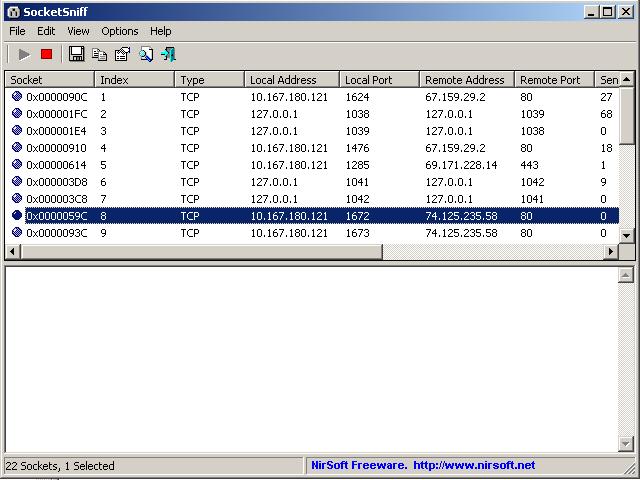
Watch the Windows Sockets (WinSock) activity of the selected process.

SocketSniff allows you to watch the Windows Sockets (WinSock) activity of the selected process.

For each created socket, SocketSniff will display the following information: socket handle, socket type, local and remote ports, local and remote addresses, total number of send/receive bytes and much more.

You can also watch the content of each send or receive call, in Ascii mode or as Hex Dump.


Download SocketSniff

Netstat Viewer

Netstat Viewer is a handy GUI replacement for command line app netstat

Netstat Viewer is a useful graphic user interface replacement for the command line application netstat.

The netstat command displays active TCP connections, ports on which the computer is listening, Ethernet statistics, the IP routing table, IPv4 statistics (for the IP, ICMP, TCP, and UDP protocols), and IPv6 statistics (for the IPv6, ICMPv6, TCP over IPv6, and UDP over IPv6 protocols).


Download Netstat Viewer

NetStat Agent

NetStat Agent is a powerful and extremely useful network tool for monitoring and diagnosing. NetStat Agent includes useful network tools such as ping, traceroute, ipconfig, netstat, DNS query (nslookup), whois, arp, route and HTTP checker, but in a clean graphical interface.

NetStat Agent allows network administrators to monitor TCP and UDP connections, diagnose connection settings, troubleshoot network configuration, and obtain information about network resources such as remote hosts and domain names.

The built-in Whois tool queries domain names for exact information about their owner, and allows checking whether a domain name is taken or still available without visiting any domain registrar's Web sites.


Download NetStat Agent


Retina Conficker Scanner

The Conficker worm utilizes a variety of attack vectors to transmit and receive payloads, including: software vulnerabilities (e.g. MS08-067), portable media devices (e.g. USB thumb drives and hard drives), as well as leveraging endpoint weaknesses (e.g. weak passwords on network-enabled systems). The Conficker worm will also spawn remote access backdoors on the system and attempt to download additional malware to further infect the host.

Read more: Retina Network Security Scanner - Conficker Worm - Free software downloads and software reviews


Download Retina Conficker Scanner

Conficker Detection Tool

The Conficker worm may have infected more machines than originally thought, according to PC World. If the worm is successfully exploited, it could give hackers easy access to your system by allowing remote code execution when file sharing is enabled.

McAfee has developed a Conficker detection tool that you can use to quickly identify infected systems and machines. If you find infected machines, you should patch and reboot them to clean the system. Once clean, the machines should be rebooted again to prevent reinfection.


Download Conficker Detection Tool

Most Wanted